News Ticker

Menu
Powered by Blogger.

Browsing "Older Posts"

Better GUI Resource Pack - Compatible with Minecraft: 1.9.4, 1.9

Sunday, May 29, 2016 / No Comments
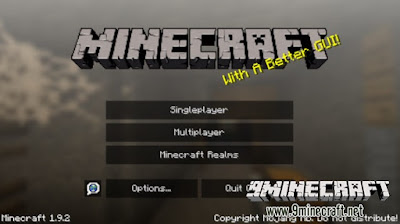
The name is pretty self-explanatory, It’s a better GUI. Better GUI resource pack changes most of the ugly default Minecraft GUI and makes it better. I’ve worked hard on this for the past several weeks and I hope you enjoy it. Personally I think it looks a lot better than the original minecraft GUI.-CalebThePotato-

Screenshots

better-gui-resource-pack-1
better-gui-resource-pack-2
better-gui-resource-pack-3
better-gui-resource-pack-4
better-gui-resource-pack-5
better-gui-resource-pack-6
better-gui-resource-pack-7
better-gui-resource-pack-8

How to install Better GUI Resource Pack?

  • Download the Resource Pack.
  • Open Minecraft, and go to Options->Resource Packs->Open Resource Packs Folder.
  • Drag the zip file you downloaded into that folder.
  • Select the pack, and you’re done!

Download links for Better GUI Resource Pack

for Minecraft 1.9.X

Sorogon’s Resource Pack - Compatible with Minecraft: 1.9.4, 1.9

/ No Comments
It´s a very simple Resourcepack for Minecraft 1.9 & 1.10 made for and by me. It is very simple and I am updating it whenever something new is added to the game or I don’t like how something looks. If you have any wishes or suggestions please use the comment section. The File is packed as .rar, you have to unpack it with WinRAR or 7zip. -Sorogon-

Screenshots

sorogons-resource-pack-1
sorogons-resource-pack-2
sorogons-resource-pack-3
sorogons-resource-pack-4
sorogons-resource-pack-5
sorogons-resource-pack-7
sorogons-resource-pack-8
sorogons-resource-pack-56

How to install Sorogon’s Resource Pack?

  • Download the Resource Pack.
  • Open Minecraft, and go to Options->Resource Packs->Open Resource Packs Folder.
  • Drag the zip file you downloaded into that folder.
  • Select the pack, and you’re done!

Download links for Sorogon’s Resource Pack

for Minecraft 1.9.X

Skyrim Resource Pack - Compatible with Minecraft: 1.9.4, 1.9, 1.8.9, 1.8, 1.7.10

/ No Comments
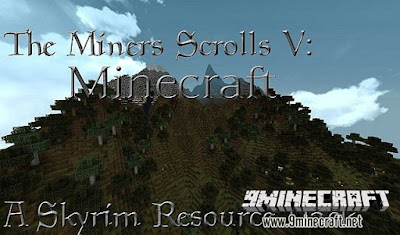
Skyrim Resource Pack is designed to look like Skyrim in the resolution of x32 so most computers can still use it.

Screenshots

Skyrim-resource-pack-1.jpg
Skyrim-resource-pack-2.jpg
Skyrim-resource-pack-3.jpg
Skyrim-resource-pack-4.jpg
Skyrim-resource-pack-5.jpg
Skyrim-resource-pack-6.jpg
Skyrim-resource-pack-7.jpg
Skyrim-resource-pack-8.jpg
Skyrim-resource-pack-9.jpg
Skyrim-resource-pack-10.jpg
Skyrim-resource-pack-11.jpg
Skyrim-resource-pack-12.jpg

How to install Skyrim Resource Pack

  • Download the resource pack.
  • Open Minecraft, and go to Options->Resource Packs->Open Resource Packs Folder.
  • Drag the zip file you downloaded into that folder.
  • Select the pack, and you’re done!

Download Skyrim Resource Pack

for Minecraft 1.8.X
for Minecraft 1.9.X

Good Morning Craft Resource Pack - Compatible with Minecraft: 1.8.9, 1.8, 1.7.10

/ No Comments
About Good Morning Craft Resource Pack
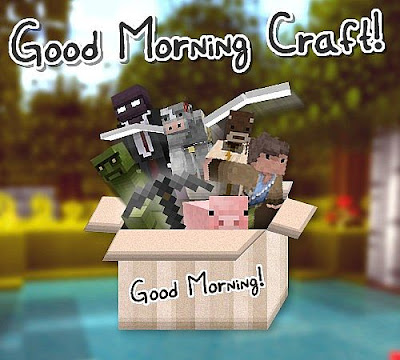
Good Morning Craft is a simple, yet quirky 16p texture pack that offers a complete overhaul of the textures on Minecraft with no FPS loss.

http://img.9minecraft.net/TexturePack1/Good-morning-craft-texture-pack-1.jpg


http://img.9minecraft.net/TexturePack1/Good-morning-craft-texture-pack-2.jpg

How to Install Good Morning Craft Resource Pack for Minecraft

  • Make sure your  Minecraft is updated to 1.6 or higher
  • Download the resource pack and put it somewhere easily accessible (Desktop)
  • Open up your .minecraft from Run > %appdata% > .minecraft
  • Open the resource pack folder which is inside the .minecraft
  • Then just drag and drop your resource pack to this resource pack folder
  • Close everything and enjoy!

Download Good Morning Craft Resource Pack

for Minecraft 1.8.X
for Minecraft 1.9.X

Legend of Zelda Phantom Hourglass Resource Pack - Compatible with Minecraft: 1.9.4, 1.9, 1.8.9, 1.8, 1.7.10

/ No Comments

About Legend of Zelda Phantom Hourglass Resource Pack

Zelda Phantom Hourglass Resource Pack – A Minecraft Texurepack inspired by Legend of Zelda : Phantom Hourglass!
Supports lots of random Textures, random Mobs and custom skies. Needs latest version of MCPatcher or Optifine to work!

Screenshots

Zelda-phantom-hourglass-pack-1.jpg
Zelda-phantom-hourglass-pack-2.jpg
Zelda-phantom-hourglass-pack-3.jpg
Zelda-phantom-hourglass-pack-4.jpg
Zelda-phantom-hourglass-pack-5.jpg
Zelda-phantom-hourglass-pack-6.jpg
Zelda-phantom-hourglass-pack-7.jpg
Zelda-phantom-hourglass-pack-8.jpg

How to install:

  • Download the resource pack.
  • Open Minecraft, and go to Options->Resource Packs->Open Resource Packs Folder.
  • Drag the zip file you downloaded into that folder.
  • Select the pack, and you’re done!

Download links for Zelda Phantom Hourglass Resource Pack

for Minecraft 1.8.X
for Minecraft 1.9.X

DEM Resource Pack - Compatible with Minecraft: 1.9.4, 1.8.9, 1.8, 1.7.10

/ No Comments
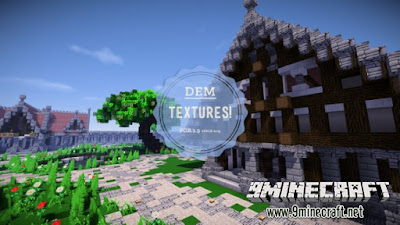
DEM Resource Pack! Made with love!
DEM-resource-pack.jpg
DEM-resource-pack-1.jpg
DEM-resource-pack-2.jpg
DEM-resource-pack-3.jpg
DEM-resource-pack-4.jpg
DEM-resource-pack-5.jpg
DEM-resource-pack-6.jpg
DEM-resource-pack-7.jpg
DEM-resource-pack-8.jpg

How to install DEM Resource Pack:

  • Download the resource pack.
  • Open Minecraft, and go to Options->Resource Packs->Open Resource Packs Folder.
  • Drag the zip file you downloaded into that folder.
  • Select the pack, and you’re done!

Download DEM Resource Pack: